
Featured photograph: A clock beside a laptop. Photo: Monstera Production, Pexels License. Full frame, display-scaled only. Contextual stock photograph, not a learner attempt, a product interface or an assessment result.
Find out what the countdown is measuring
A timer records elapsed time. It does not tell you whether that time was spent making the intended decision, reading a dense instruction, hunting for a control or waiting for a page to save. Before using speed in a training assessment, separate those demands.
The audit below concerns a fictional online assessment for support advisers. Its target is choosing the correct routing action from a supplied service guide and explaining the choice. Rapid navigation is not part of the stated target. The platform currently imposes an eight-minute attempt limit because that was its template setting. That is a configuration fact in this invented case, not a reason to treat eight minutes as a performance standard.
All timings and screen text here are synthetic design examples. No learner has completed this task, and no completion rate, accessibility test or validated cut-off is claimed. Use the example to prepare your own observation, not to borrow its numbers as a time allowance.
Separate the clocks before observing an attempt
Record each constraint separately: the attempt countdown, an inactivity timeout, an authentication/session expiry and the date by which the assignment must be submitted. They can have different owners and consequences. Extending the quiz timer may not prevent a session expiring, and a submission date is not automatically the same kind of content-set countdown.
For each clock, write its trigger, duration, warning, expiry action and adjustment controls. Does the attempt begin when the page opens or after instructions? Does changing an answer reset an inactivity clock? Is completed work retained if authentication expires? Treat unknown behavior as something to test, not as a reassuring assumption.
Agree what you are assessing with the assessment owner. If quick decisions genuinely form part of the intended skill, specify which decision and under what conditions. A general preference for fast staff is not a precise rationale. Route questions about essential timing and access arrangements to the people responsible for assessment validity, accessibility and organisational policy rather than deciding them through a platform default.
A fictional walkthrough makes the hidden demands visible
Imagine a rehearsal in a sandbox with automatic expiry disabled, so an observer could see the whole sequence. The following is an invented event log, not pilot evidence. From 0:00 to 0:45 the learner locates the brief; from 0:45 to 2:15 reads the case; from 2:15 to 4:45 reasons about the routing decision. From 4:45 to 5:15 they find the reference control, then read the relevant rule until 6:05.
Reasoning continues from 6:05 to 8:05. Entering the answer takes until 9:10; waiting for save confirmation takes until 9:40. The eight-minute countdown would expire during the second reasoning interval, before answer entry. That describes the consequence of the invented settings, not a finding about any group of learners.
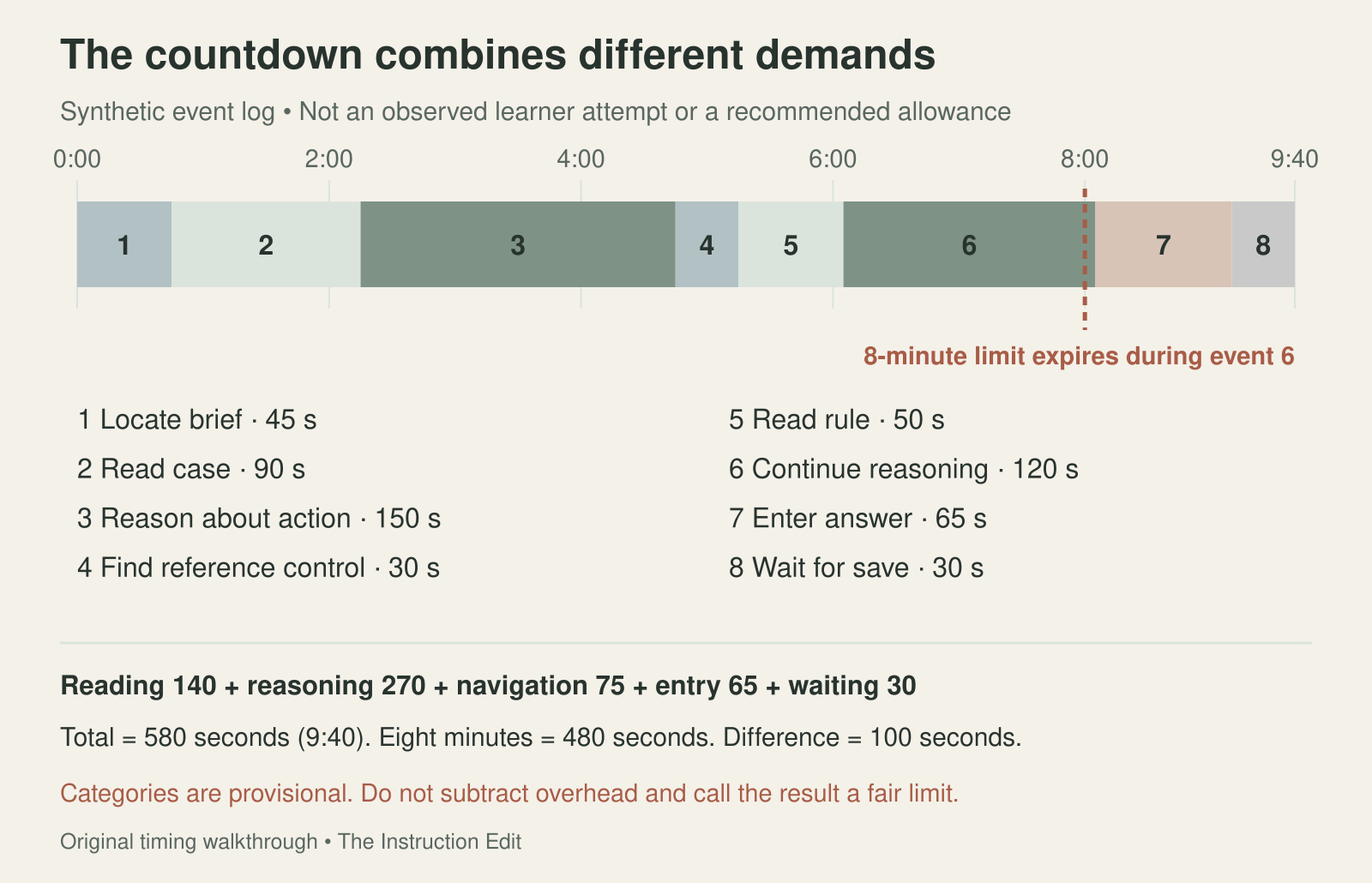
Figure 1. The fictional event log separates demands hidden inside one countdown. Original synthetic timeline by The Instruction Edit; not observed pilot data.
The categories total 140 seconds reading, 270 reasoning, 75 navigation, 65 response entry and 30 system waiting: 580 seconds, or 9 minutes 40 seconds. Reading plus reasoning accounts for 410 seconds; navigation, entry and waiting account for 170. The total exceeds eight minutes by 100 seconds.
Do not simply subtract the 170 seconds and declare a new limit. Reading may be central to using the guide; response entry may be necessary to demonstrate the decision. Nor can an observer infer silent reasoning perfectly. Record visible events first, then ask the participant about ambiguous intervals after the attempt. Label uncertainty and overlapping activities rather than forcing every second into a confident explanation.
Use an observation sheet without turning it into surveillance
Prepare these fields: attempt code; task and version; device and input method; timer settings; timestamp start and end; observable action; provisional category; uncertainty; interruption or error; consequence for completion; participant clarification; and proposed change. Record only what is needed for this design question. Do not put a diagnosis or unrelated personal information in the timing log.
Before a real pilot, explain the observation and how notes will be used. Agree access arrangements and the handling of technical failures. Where appropriate, let people use the tools and modes they would normally use. A think-aloud exercise can help reveal confusion, but talking changes the task and its duration; do not treat those timings as an unaltered performance benchmark.
One attempt can reveal a confusing control. It cannot establish a fair limit for everyone. Observe relevant variation in tasks, devices and ways of accessing the material, and compare both successful and interrupted attempts. Keep technical waiting separate from decisions, but do not assume an interface repair automatically removes every timing barrier.
Make a decision for each constraint
For the fictional eight-minute attempt limit, the record is: owner—assessment designer; rationale—template default only; target—routing accuracy and justification, not speed; decision—remove the forced countdown from the next private pilot, pending the owner’s confirmation and platform test. Retain elapsed-time logging only for the agreed audit purpose. This is a proposal for this case, not a rule that all timed assessments must be untimed.
For the reference-control delay, assign the learning-platform owner to test a visible, consistently named reference link and familiarisation task. For save waiting, ask the technical owner to reproduce the delay and verify what happens to work at expiry. Neither issue should be relabeled as a learner’s slow reasoning.
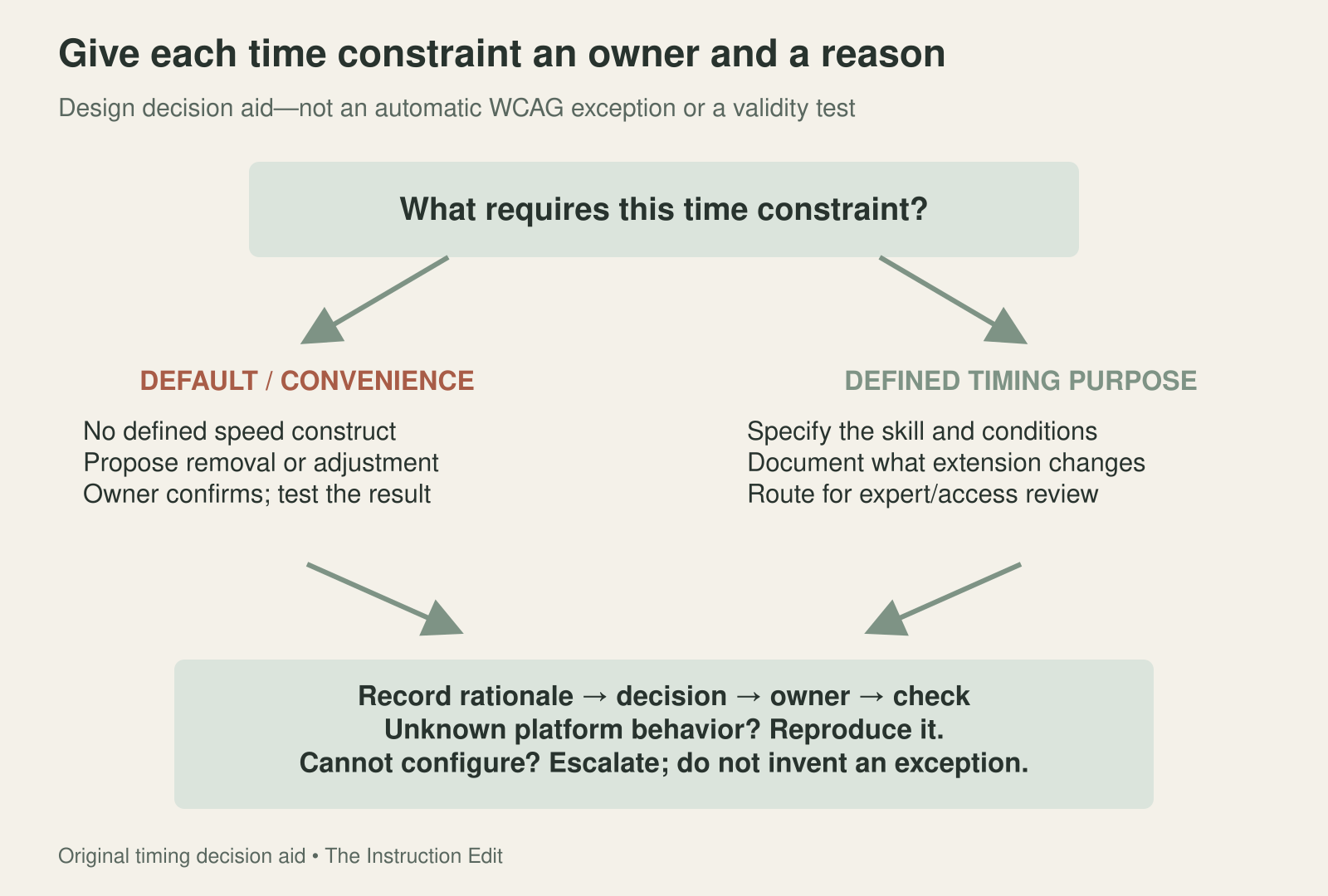
Figure 2. Record why each constraint exists and who can decide what happens to it. Original decision aid by The Instruction Edit, not a legal or conformance determination.
If an owner claims timing is essential, record the specific construct, why changing the time would alter it, what alternatives were considered and who will review the decision. Do not grant an exception merely because the platform cannot be configured. Log an unresolved platform limitation as a limitation and agree an appropriate alternative or escalation before launch.
Specify behavior, not just a warning banner
W3C’s explanation of WCAG 2.2 Success Criterion 2.2.1 describes alternatives for content-set time limits: turning them off, adjusting them before use, or extending them with specified safeguards. Its extension option includes at least 20 seconds to act and at least ten extensions. It also describes specific real-time, essential and over-20-hour exceptions. The Understanding document is informative guidance; this audit is not a legal opinion or a WCAG conformance assessment.
The mockup below illustrates an extension path for a task where a limit is retained. It is not the proposed untimed configuration for the fictional routing pilot. “Extend by 8 minutes” is example interface copy, not a recommended allowance. The display alone proves nothing about keyboard access, focus, announcements, repeated extensions or preservation of responses.
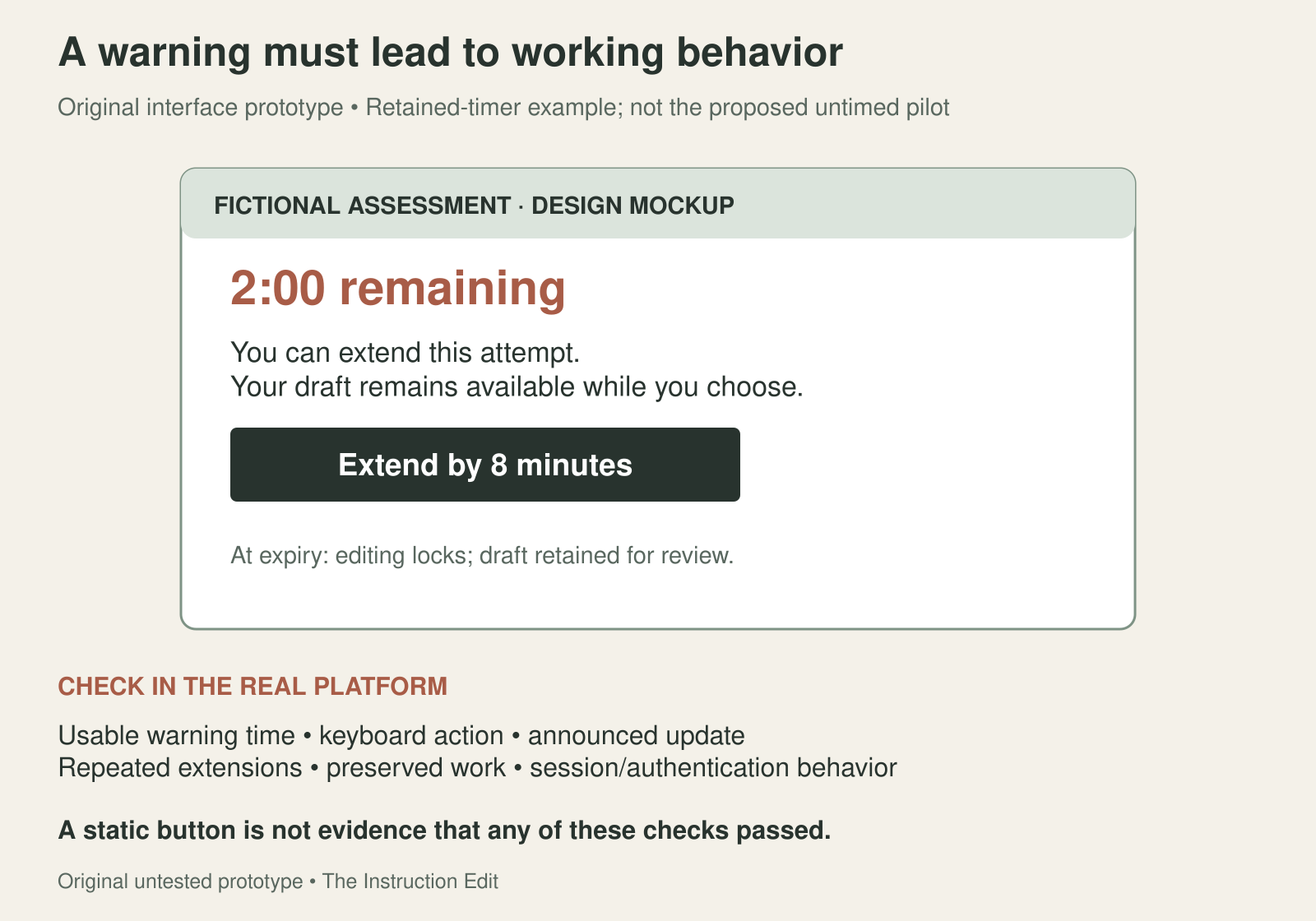
Figure 3. A retained-timer prototype makes behavior testable. Original unimplemented mockup by The Instruction Edit; not a platform screenshot, tested configuration or accessibility certification.
Turn the mockup into acceptance checks: the warning arrives with enough usable time; its action works without a pointer; the updated time is communicated; repeated extensions behave as specified; saved and unsaved responses are handled transparently; and the screen explains what will happen at expiry. Test the actual session and authentication behavior as well as the assessment page. Do not label the prototype accessible because it contains a button.
Keep a final decision record with the constraint, intended purpose, observed evidence, decision, owner, required implementation check and review date. Mark a decision “proposed” until the responsible person confirms it, and “implemented” only after the configuration is checked. A setting saved in an administrator panel is not evidence that learners encounter the intended behavior.
Observe one pilot attempt and account separately for task reasoning, reading and interface overhead before setting the final limit. The useful result is not a more generous number by default. It is a defensible account of which time demands belong to the assessment and which ones the design has accidentally added.
Source
W3C — Understanding SC 2.2.1: Timing Adjustable, accessed October 30, 2026. The case, event log, observation sheet, decision record and warning prototype are original fictional design materials, not a tested assessment or a compliance certificate.
